Exercism - Bottle Song
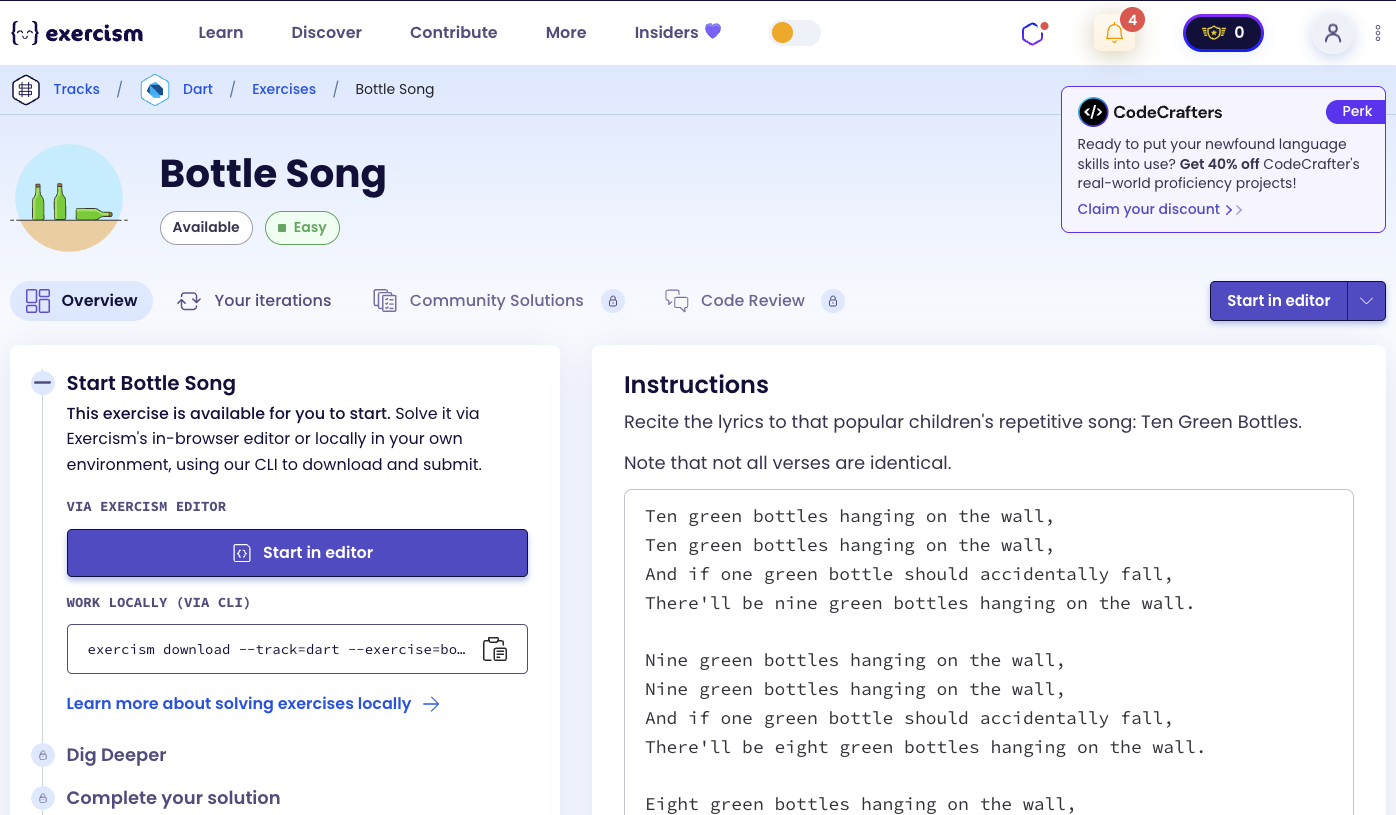
This post shows you how to get Bottle Song exercise of Exercism.

Preparation
Before we click on our next exercise, let’s see what concepts of DART we need to consider
So we need to use the following concepts.
Lists
Lists are ordered collections of items. You can add elements, add multiple elements at once, and build lists dynamically.
void main() {
  // Create empty list
  List<String> lyrics = <String>[];

  // Add single element
  lyrics.add('Line 1');

  // Add multiple elements
  lyrics.addAll(['Line 2', 'Line 3', 'Line 4']);

  print(lyrics); // [Line 1, Line 2, Line 3, Line 4]

  // Add empty string for spacing
  lyrics.add('');
  lyrics.add('Line 5');
  print(lyrics); // [Line 1, Line 2, Line 3, Line 4, , Line 5]
}
For Loops
For loops allow you to iterate a specific number of times. They’re perfect for generating repetitive content.
void main() {
  List<String> verses = [];

  // Loop from 0 to takeDown - 1
  int takeDown = 3;
  for (int i = 0; i < takeDown; i++) {
    int current = 10 - i; // 10, 9, 8
    verses.add('Verse for $current bottles');
  }

  print(verses);
  // [Verse for 10 bottles, Verse for 9 bottles, Verse for 8 bottles]
}
String Interpolation
String interpolation allows you to embed expressions and variables directly within strings using ${expression} or $variable.
void main() {
  int current = 5;
  String word = 'bottles';

  // Basic interpolation
  String line = '$current green $word hanging on the wall,';
  print(line); // "5 green bottles hanging on the wall,"

  // Expression interpolation
  int next = current - 1;
  String line2 = "There'll be $next green $word hanging on the wall.";
  print(line2); // "There'll be 4 green bottles hanging on the wall."
}
Helper Methods
Helper methods (often private methods starting with _) encapsulate reusable logic, making code more organized and maintainable.
class BottleSong {
  // Public method
  List<String> recite(int start, int takeDown) {
    // Uses helper methods
    String word = _bottleWord(5);
    String number = _numberToWord(5);
    return [];
  }

  // Private helper method
  String _bottleWord(int n) {
    return n == 1 ? 'bottle' : 'bottles';
  }

  // Another helper method
  String _numberToWord(int n) {
    return 'five';
  }
}
Named Parameters with Required
Named parameters allow you to pass arguments by name. The required keyword makes a named parameter mandatory.
void main() {
  String format(int n, {required bool capitalize}) {
    String word = 'five';
    return capitalize ? word.toUpperCase() : word;
  }

  // Must provide capitalize parameter
  String result1 = format(5, capitalize: true); // "FIVE"
  String result2 = format(5, capitalize: false); // "five"

  // This would cause an error:
  // String result3 = format(5); // Error: required parameter missing
}
String Methods
Strings have many useful methods. toUpperCase() converts a character to uppercase, and substring() extracts part of a string.
void main() {
  String word = 'five';

  // Get first character and uppercase it
  String first = word[0].toUpperCase();
  print(first); // 'F'

  // Get substring from index 1 to end
  String rest = word.substring(1);
  print(rest); // 'ive'

  // Capitalize first letter
  String capitalized = word[0].toUpperCase() + word.substring(1);
  print(capitalized); // 'Five'
}
Conditional Logic
Conditional statements allow you to execute different code based on conditions. This is essential for handling special cases.
void main() {
  int n = 1;

  // Check for singular/plural
  String bottle = n == 1 ? 'bottle' : 'bottles';
  print(bottle); // 'bottle'

  // Add spacing conditionally
  List<String> lyrics = [];
  int i = 1;
  if (i > 0) {
    lyrics.add(''); // Empty line between verses
  }

  // Calculate next value
  int current = 5;
  int next = current - 1;
  print(next); // 4
}
Constants
Constants are values that don’t change. The const keyword creates compile-time constants.
void main() {
  // Constant list
  const words = [
    'no', 'one', 'two', 'three', 'four', 'five',
    'six', 'seven', 'eight', 'nine', 'ten'
  ];

  // Access by index
  print(words[0]); // 'no'
  print(words[5]); // 'five'
  print(words[10]); // 'ten'

  // Use in calculations
  int n = 5;
  String word = words[n];
  print(word); // 'five'
}
Introduction
Recite the lyrics to that popular children’s repetitive song: Ten Green Bottles.
Note that not all verses are identical.
Instructions
The song follows a pattern where each verse counts down from a starting number. Each verse has four lines:
- “[Number] green [bottle/bottles] hanging on the wall,”
- “[Number] green [bottle/bottles] hanging on the wall,”
- “And if one green bottle should accidentally fall,”
- “There’ll be [next number] green [bottle/bottles] hanging on the wall.”
The song continues counting down until reaching zero. Special cases:
- When the number is 1, use “bottle” (singular) instead of “bottles” (plural)
- When the next number is 0, use “no” instead of “zero”
- The first word of each line should be capitalized when it starts a verse
Example Verses
Ten bottles:
Ten green bottles hanging on the wall,
Ten green bottles hanging on the wall,
And if one green bottle should accidentally fall,
There'll be nine green bottles hanging on the wall.
One bottle:
One green bottle hanging on the wall,
One green bottle hanging on the wall,
And if one green bottle should accidentally fall,
There'll be no green bottles hanging on the wall.
What is the Bottle Song?
“Ten Green Bottles” is a children’s counting song that helps teach subtraction. The song counts down from ten bottles to zero, with each verse describing one bottle falling. It’s similar to “99 Bottles of Beer” but designed for younger children. The repetitive nature makes it easy to learn and helps with number recognition and counting backwards.
— Children’s Songs
How can we generate the lyrics?
To generate the lyrics:
- Loop through verses: For each verse from
startBottlesdown tostartBottles - takeDown + 1 - Calculate current and next: Current number decreases each iteration, next is current - 1
- Add spacing: Add an empty line between verses (except before the first)
- Build each verse: Create four lines per verse:
- Two lines with current number (capitalized)
- One line with “And if one green bottle should accidentally fall,”
- One line with next number (not capitalized)
- Handle special cases:
- Use “bottle” for 1, “bottles” for other numbers
- Use “no” for 0
- Capitalize first word when starting a verse
The key insight is using helper methods to convert numbers to words and handle singular/plural, then building verses in a loop.
Solution
class BottleSong {
  List<String> recite(int startBottles, int takeDown) {
    final lyrics = <String>[];

    for (int i = 0; i < takeDown; i++) {
      final current = startBottles - i;
      final next = current - 1;

      if (i > 0) {
        lyrics.add(''); // Empty line between verses
      }

      lyrics.addAll([
        '${_numberToWord(current, capitalize: true)} green ${_bottleWord(current)} hanging on the wall,',
        '${_numberToWord(current, capitalize: true)} green ${_bottleWord(current)} hanging on the wall,',
        'And if one green bottle should accidentally fall,',
        "There'll be ${_numberToWord(next, capitalize: false)} green ${_bottleWord(next)} hanging on the wall."
      ]);
    }

    return lyrics;
  }

  String _numberToWord(int n, {required bool capitalize}) {
    const words = [
      'no', 'one', 'two', 'three', 'four', 'five',
      'six', 'seven', 'eight', 'nine', 'ten'
    ];
    final word = words[n];
    return capitalize ? word[0].toUpperCase() + word.substring(1) : word;
  }

  String _bottleWord(int n) => n == 1 ? 'bottle' : 'bottles';
}
Let’s break down the solution:
-
List<String> recite(int startBottles, int takeDown)- Main method that generates lyrics:- Takes starting number of bottles and how many verses to generate
- Returns a list of strings (all lines of all verses)
-
final lyrics = <String>[]- Initialize empty list:- Uses type inference with
<String>[]syntax - Will contain all lines from all verses
- Uses type inference with
-
for (int i = 0; i < takeDown; i++)- Loop to generate verses:- Iterates
takeDowntimes irepresents the verse index (0, 1, 2, …)
- Iterates
-
final current = startBottles - i- Calculate current bottle count:- Decreases with each iteration
- Example: startBottles=10, i=0 → current=10; i=1 → current=9
-
final next = current - 1- Calculate next bottle count:- One less than current
- Example: current=10 → next=9; current=1 → next=0
-
if (i > 0) lyrics.add('')- Add spacing between verses:- Adds empty string before each verse except the first
- Creates visual separation between verses
-
lyrics.addAll([...])- Add all four lines of the verse:- Line 1 & 2: Current number (capitalized) with bottle/bottles
- Line 3: Fixed text “And if one green bottle should accidentally fall,”
- Line 4: Next number (not capitalized) with bottle/bottles
-
String _numberToWord(int n, {required bool capitalize})- Helper to convert number to word:const words = [...]: Constant list mapping index to word (0=‘no’, 1=‘one’, etc.)final word = words[n]: Get the word for number n- Capitalization logic: If capitalize is true, uppercase first letter and concatenate with rest
- Returns “Five” if capitalize=true, “five” if capitalize=false
-
String _bottleWord(int n) => n == 1 ? 'bottle' : 'bottles'- Helper for singular/plural:- Uses expression-bodied method
- Returns “bottle” for 1, “bottles” for all other numbers (including 0)
The solution efficiently generates the repetitive song lyrics by using helper methods for number-to-word conversion and singular/plural handling, then building verses in a loop with proper spacing.
A video tutorial for this exercise is coming soon! In the meantime, check out my YouTube channel for more Dart and Flutter tutorials. 😉
Visit My YouTube Channel